
Pipo Communications

PIPO PROGRAMMING SOFTWARE

PIPO DTMF ENCODER PROGRAMMER V6.5

The Pipo DTMF Encoder Programmer v6.5 software is compatible with Windows 7, 8, 10, and 11.
It enables the programming of all Pipo DTMF Encoders via a USB port using a 5V USB-to-Serial cable, with the wiring diagram provided at the end of this page.
Product selection is based on the memory capacity of the device.
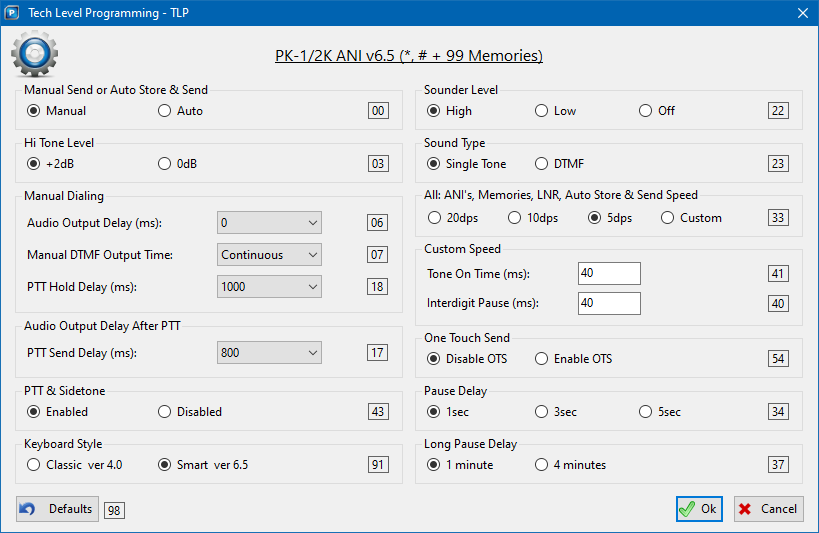
In addition to programming the memory, default values can also be configured using the Tech Level Program (TLP) interface, as shown below.

MAIN SCREEN DESCRIPTION

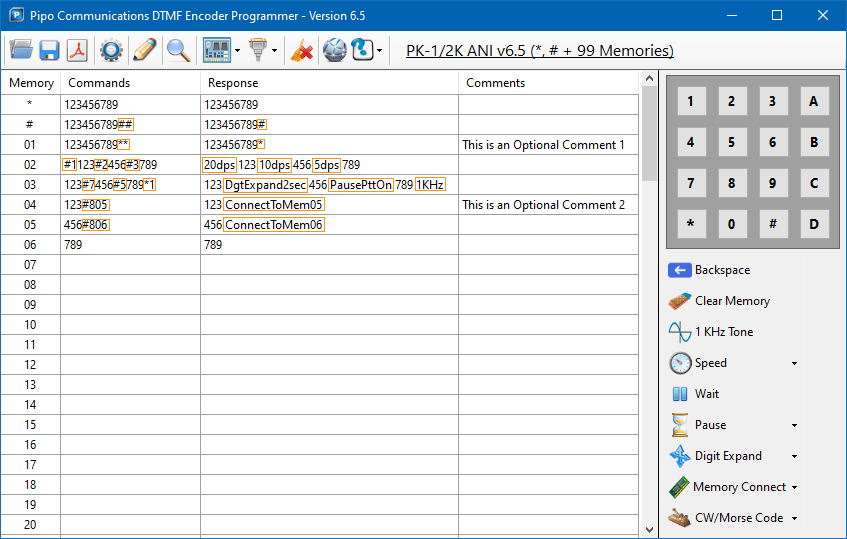
All Pipo Communications DTMF encoders with memory can be programmed directly using their keyboard. This program has been created to make programming easier.

The memory list has the columns:
• Commands: The user edits this to create the DTMF string.
• Response: This read-only column shows the encoder’s response to the DTMF string.
Comments: This optional column includes any notes the user wants to add.

For example, in Memory 02 (shown in the figure to the left):
DTMF digits 123 are sent at 20dps.
Digits 456 are sent at 10dps.
Digits 789 are sent at 5dps.

Codes #1, #2, and #3 can be entered manually or generated automatically using the “Speed” option in the right sidebar.

MAIN SCREEN MENU BUTTONS

In Pipo Communications DTMF Encoder Programmer – Version 6.5, the menu uses icons to make it easy for the user to navigate and use the program.

When the user hovers the mouse over an icon, a tool tip text will appear showing the name of the icon and the keyboard shortcut that can be used.

To execute a command, users simply click on the icon. For commands that require additional parameters or settings, relevant sub-menus will be displayed to the user.

Descriptions of each item are displayed alongside.

Load Data File from Disk. Loads a previously stored memory list & TLP from computer. Once loaded it can be copied to the encoder by clicking on the Write Data to Encoder.

Save Data File to Disk. Saves current memory list & TLP as a (*.pip) file on computer. The file can be shared or loaded again.

Export to PDF File. Creates a PDF copy on your computer for printing

Tech Level Programming. Opens the TECH LEVEL PROGRAM (TLP) screen below.

Write Data to Encoder. Writes the current memory list & TLP to encoder. All previously stored data on the encoder will be removed.

Read Data from Encoder. Reads data from encoder so that it can be saved as (*pip) file to be loaded again or shared.

Product Model Setup. Selects the Pipo DTMF Encoder based on the number of memories. For example, in the previous figure, the 99 memories encoder was selected, and its name appears on the right side of the program's top bar.

Communication Port. Selects the communication port connected to the encoder via USB cable.

Clear All. Deletes the entire memory list. This action cannot be undone.

Pipo Communications Web Site. Opens the Pipo Communications website.

Help. Pipo DTMF Encoders Programmer help instructions and examples. Also, information about the program version.
MEMORY PROGRAMMING BUTTONS

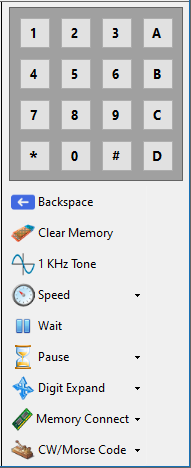
These buttons let the user to automatically add programming codes to the DTMF string, so user don’t have to enter them manually.

Mouse Keyboard. Simulates an encoder keyboard. Programming can be done using the mouse instead of the PC keyboard.

Backspace. Same as PC keyboard backspace key.

Clear Memory. Deletes the selected memory line. This action cannot be undone.

1 KHz Tone. It adds the code (*1) to implement the 1KHz tone. This tone is used for testing or generating CW/Morse Code.

Speed. We can select from 5dps (#3), 10dps (#2), 20dps (#1), or Custom Speed (*7). The default value for these options is set in the Tech Level Program. For Custom Speed, the Tone On Time and Inter-Digit Pause are also set in the Tech Level Program and can range from 15ms to 9,999ms.

Wait. When the Wait (#0) command is reached, the DTMF string transmission pauses until any key is pressed on the encoder’s keypad.

Pause. The user can add a 1, 3, or 5-second pause with PTT On (#5) or Off (#4), or a long pause of 1 or 4 minutes with PTT Off (#9). The pause durations are set in the Tech Level Program.

Digit Expand. The Digit Expand command lets the user choose between expanding the current DTMF digit in 200ms (#6) or 2 seconds (#7).

Memory Connect. The Memory Connect Command (#8) is endless. You can use this command based on system requirements and your creativity. It links memories together and can be looped if needed.

CW/Morse Code. Here, we can choose the Morse code transmission speed between 12, 18, 24, and 48 words per minute (wpm). We can also open a window to type the desired text, and the program automatically converts it to the Morse codes used for programming the memories. Since the memory size is limited to 30 digits, the above Memory Connect feature is extensively used for longer phrases. This programming versatility makes the product suitable for use as a CW Identifier in Radio Repeaters.
MEMORY PROGRAM COMMANDS LIST

*1 = 1 KHz Test Tone
*2 = CW/Morse Dot (.) 50ms=1 Unit
*3 = DTMF “A”
*4 = CW/Morse Pause Between Letters 150ms=3 Units
*5 = CW/Morse Dash (-) 150ms=3 Units
*6 = DTMF “B”
*7 = SET TO CUSTOM SPEED
*8 = CW/Morse Pause Between Words 350ms=7 Units
*9 = DTMF “C”
** = DTMF “*”
*# = DTMF “D”

#0 = Wait
#1 = 20 DPS
#2 = 10 DPS
#3 = 5 DPS
#4 = PAUSE 1-3-5 sec w/ PTT Drop
#5 = PAUSE 1-3-5 sec w/ PTT On
#6 = DIGIT EXPAND 200ms
#7 = DIGIT EXPAND 2sec
#8 = MEMORY CONNECT
#9 = LONG PAUSE ADJ 1-4 min w/PTT Drop
## = DTMF “#”

EXTRAS (WHEN USING MORSE CODE):
#3 = 12wpm (5 DPS) 1 Time Unit = 100mS
*7 = 18wpm (CUSTOM SPEED) 1 Time Unit = 66.7ms
#2 = 24wpm (10 DPS) 1 Time Unit = 50mS
#1 = 48wpm (20 DPS) 1 Time Unit = 25mS

TECH LEVEL PROGRAM - TLP

The Tech Level Program (TPL) lets users customize the DTMF encoder by changing default settings.

The Tech Level Program screen is self-explanatory and displays all the decoder parameters that users can adjust.

The read-only rectangles show the codes used when programming directly from the encoder’s keyboard, just for reference.

For more information on the maximum and minimum values shown on the screen, please refer to the Tech Level Program Commands List below.

TECH LEVEL PROGRAM COMMANDS LIST

00 – Manual Send: (Default)
01 – Auto Store & Send: Sends 2.3 sec after the last entry.

02 – High Tone Level: 0dB
03 – High Tone Level: +2dB (Default)

06 – Manual Dialing Audio Output Delay: Audio Output Delay after PTT during manual dialing (0 to 2000ms, Default=0).

07 – Manual Dialing DTMF Output Time: Continuous (Default)
08 – Manual Dialing DTMF Output Time: 200 ms
09 – Manual Dialing DTMF Output Time: 500 ms

18 – Manual Dialing PTT Hold Delay: PTT Drop Delay after release key (0 to 10,000ms, Default=1000ms)

17 – PTT Send Delay: Audio Output Delay after PTT for all ANIs, Memories & LNR (0 to 3,000ms, Default=800ms)

43 – Enable PTT & Sidetone: (Default)
42 – Disable PTT & Sidetone:

91 – Smart Keyboard Style: Smart version 6.5 (Default)
90 – Classic Keyboard Style: Classic version 4.0

98 – Default: Defaults all functions.

22 – Sounder Level: High (Default)
21 – Sounder Level: Low
20 – Sounder Level: Off

23 – Sound Type: Single Tone (Default)
24 – Sound Type: DTMF

31 – DTMF Speed for All Kind of Memory: 20 dps
32 – DTMF Speed for All Kind of Memory: 10 dps
33 – DTMF Speed for All Kind of Memory: 5 dps (Default)
30 – DTMF Speed for All Kind of Memory: Custom Speed

40 – Custom Speed Time Off: (15ms to 9,999ms, Default=40)
41 – Custom Speed Time On: (15ms to 9,999ms, Default=40)

54 – One Touch Send OTS: Disable (Default)
55 – One Touch Send OTS: Enable

34 – Pause Delay: 1 Sec (Default)
35 – Pause Delay: 3 Sec
36 – Pause Delay: 5 Sec

37 – Long Pause Delay: 1 Minute (Default)
38 – Long Pause Delay: 4 Minutes


DOWNLOAD PIPO DTMF ENCODER PROGRAMMER (WINDOWS 7 OR HIGHER)

To avoid a security message before downloading the file, the password is: Pipo

PC PROGRAMMING USB CABLE FOR PRODUCTS